While reviewing the event logs on your Exchange server you could encounter the following error.
Log Name: Application
Source: MSExchange ADAccess
Event ID: 2112
Task Category: Topology

Description:
 Process Microsoft.Exchange.Directory.TopologyService.exe (PID=2700).
 The Exchange computer dc03.supertekboy.com does not have Audit Security
 Privilege on the domain controller dc03.supertekboy.com. This domain
 controller will not be used by Exchange Active Directory Provider.
We ran into this recently at a customer. This was an odd error because the description specified the name of one of our domain controllers as an “Exchange Computer”. That aside, my customer was receiving this error for two of their three domain controllers (dc02 & dc03). The error was also repeated across all their Exchange servers.
To make matters worse if the customer shut down the only domain controller not reported in these errors (dc01) Exchange would become completely unavailable. As the error stated, dc02 and dc03 were definitely not being used by the Exchange Active Directory Provider.
Further analysis of the event logs also revealed informational alert MSExchange ADAccess 2080. In this alert, we could see our three domain controllers with one striking difference.
Log Name: Application
Source: MSExchange ADAccess
Event ID: 2080
Task Category: Topology

Description:
 Exchange Active Directory Provider has discovered the following servers with
 the following characteristics:

 (Server name | Roles | Enabled | Reachability | Synchronized | GC capable |
 PDC |  SACL right  | Critical Data | Netlogon | OS Version)
 In-site:
 dc01.supertekboy.com CDG 1 7 7 1 0  1  1 7 1
 dc02.supertekboy.com CDG 1 7 7 1 0  0  1 7 1
 dc03.supertekboy.com CDG 1 7 7 1 0  0  1 7 1
In the eighth column (highlighted), dc01 was reporting a 1 whereas dc02 and dc03 were reporting a 0. All other column data was identical between the three servers. The words in parenthesis are actually the column headers. They don’t line up very well in event viewer but if we count to the eighth word we see the column is titled “SACL right”. What this means is that the Exchange servers are missing the SACL right on the domain controllers marked with a zero. Or more specifically, Exchange is missing the right to manage the security and audit logs of those two domain controllers.
We actually discussed this same root cause back in September for a different problem. In that article, the missing SACL right was preventing an Exchange schema update (and in turn a cumulative update) from completing. Needless to say, the fix in that article is the same for this error.
Fixing ‘MSExchange ADAccess Event ID 2112’
We discovered that the Default Domain Controllers Policy (which is a group policy assigned to the domain controllers OU) had been deleted. It was uncertain when this may have happened but it was clear that the policy existed for dc01 but had been deleted prior to the existence of dc02 and dc03. The absence of this policy was not an issue. More-so it was a setting that comes predefined by that policy. The error we were receiving was due to the absence of the User Rights Assignment, Manage auditing and security logs. This right is granted to the Exchange Servers and Administrators builtin groups.
The fix was to create a new policy with these permissions defined. Let’s explore those steps.
Note: Alternatively, you can replace the entire missing Default Domain Controller Policy by running the DCGPOFIX command:
dcgpofix /ignoreschema /target:dc
Special Thanks: Michael B. Smith
From the Group Policy Management Console, expand the domain and right-click on the Domain Controllers OU. From the context menu select Create a GPO in this domain, and Link it here. Give the new policy a name and click Ok. In our case, we called it User Rights Assignment for Exchange.
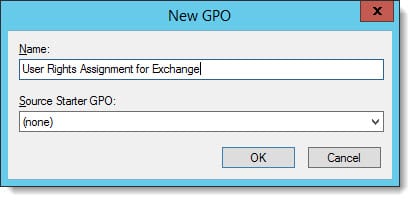
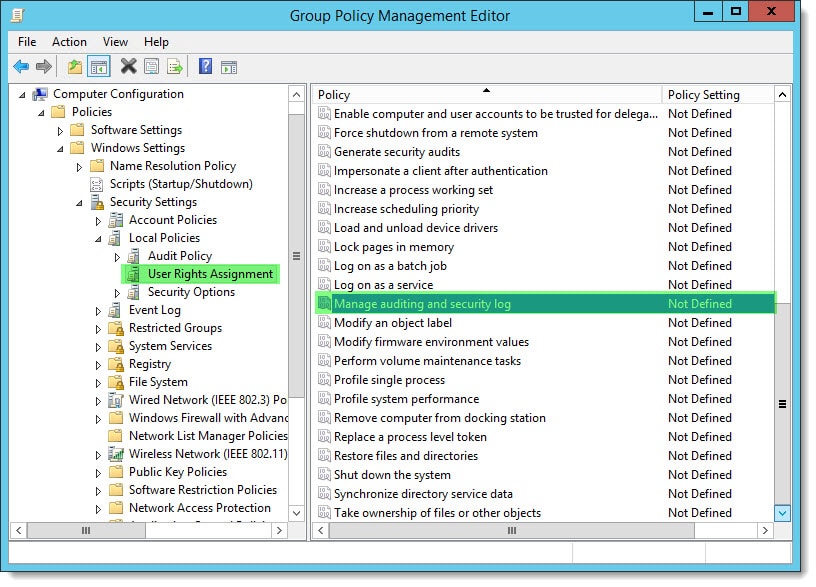
Right-click on the new policy and select Edit. This will launch the Group Policy Management Editor. Expand the following nodes.
Computer Configuration > Policies > Windows Settings > Security Settings > Local Policies > User Rights Assignment
Under User Rights Assignments double-click Manage auditing and security log.
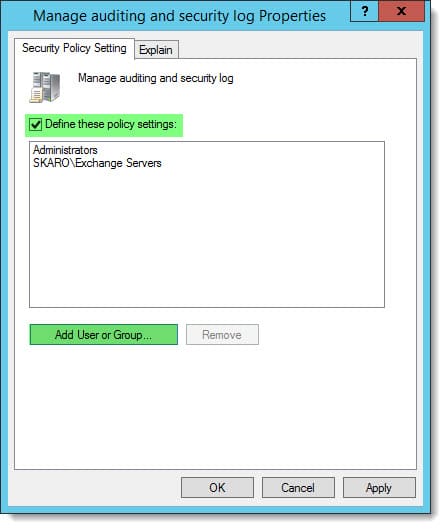
Check the box Define these policy settings. Click Add User or Group and then Browse. From the Select Users and Computers dialog add Exchange Servers. Repeat this process to add Administrators. Click Ok.
Allow time for Active Directory to replicate. You may also want to speed up the addition of the new policy by running GPUPDATE /FORCE from the command line on the problem domain controllers.
Once applied, this should mitigate error “MSExchange ADAccess 2112”. You should also see informational alert 2080 update the domain controller entries with a 1 in the SACL column.
Description:
 Exchange Active Directory Provider has discovered the following servers with
 the following characteristics:

 (Server name | Roles | Enabled | Reachability | Synchronized | GC capable |
 PDC |  SACL right  | Critical Data | Netlogon | OS Version)
 In-site:
 dc01.supertekboy.com CDG 1 7 7 1 0  1  1 7 1
 dc02.supertekboy.com CDG 1 7 7 1 0  1  1 7 1
 dc03.supertekboy.com CDG 1 7 7 1 0  1  1 7 1